Powerful Features for Every Need
WebSnapPro is packed with all the tools you need to capture, edit, and share web content effortlessly.
Advanced Screen Capture
Full Page Capture (Alt+F)
Automatically scroll and stitch entire web pages with adjustable scroll delay (750-1000ms), configurable timeout, and max height limits.
Area Selection (Alt+A)
Select specific regions with visual grid overlay, customizable colors, and precise border styling for pixel-perfect captures.
Visible Area (Alt+V)
Instantly capture the current viewport without scrolling. Perfect for quick screenshots with context menu integration.
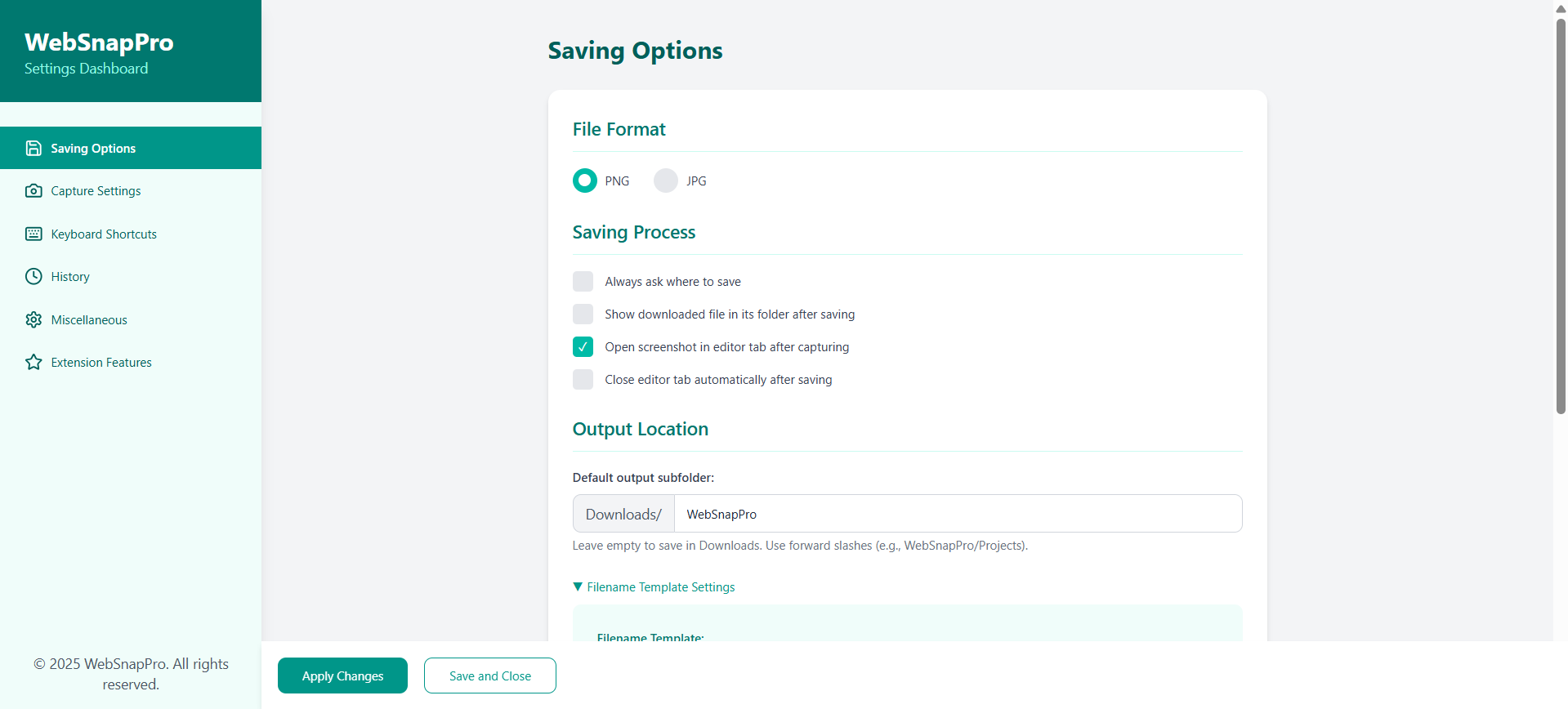
Complete Feature Overview
WebSnapPro includes everything professionals need for web capture and editing—all completely free.
Visible Area Capture (Alt+V)
Instantly capture what's currently visible on your screen. The fastest capture mode, perfect for quick screenshots without scrolling or selection.
Full Page Capture (Alt+F)
Automatically scroll and stitch entire web pages into a single image. Configurable scroll delay (750-1000ms) and max height limits for reliable captures.
Area Selection (Alt+A)
Select specific regions with a visual grid overlay. Customizable grid colors and border styles for pixel-perfect precision captures.
Drawing Tools (P, L, A)
Pencil for freehand drawing, Line for straight lines, and Arrow for directional indicators. Customizable colors, stroke widths, and styles.
Shape Tools (R, E)
Rectangle and Ellipse tools for highlighting areas. Adjust stroke colors, fill options, and border thickness for professional annotations.
Text Annotations (T)
Add text with multiple font choices, sizes, and colors. Full alignment options and editing capabilities for clear labels and explanations.
Crop Tool (C)
Trim your screenshots to the exact dimensions you need. Remove unwanted borders and focus on the content that matters.
Blur & Pixelate (B)
Protect sensitive information with adjustable blur or pixelate effects. Essential for sharing screenshots containing passwords, emails, or personal data.
Filters & Effects
Apply Grayscale, Sepia, Invert, and Vintage filters. Adjust brightness, contrast, and saturation for the perfect look.
PNG, JPG, WebP Export
Export in your preferred format with quality control. PNG for lossless quality, JPG for smaller files, WebP for optimal web performance.
Custom Filename Templates
Create organized file naming with date inclusion, sequence numbers, and padding. Never lose track of your screenshots again.
Screenshot History
All captures saved locally with powerful search by URL, date, or format. Sort by newest, oldest, or file size with configurable 1-90 day retention.
Customizable Shortcuts
Personalize all capture shortcuts to match your workflow. Editor tools have intuitive single-key shortcuts for maximum efficiency.
Undo/Redo Support
Never worry about mistakes. Full Ctrl+Z (undo) and Ctrl+Y (redo) support in the editor for confident editing.
Context Menu Integration
Right-click on any page to access capture options. No need to click the extension icon for quick captures.
Local-First Privacy
All processing and storage happens on your device. Your screenshots never leave your computer unless you choose to share them.
20+ Settings Options
Customize scroll delays, timeouts, grid overlays, editor defaults, canvas settings, rulers, and much more to match your workflow.
Notification Controls
Toggle notifications for capture completion and other events. Stay informed or work distraction-free—your choice.
Why Choose WebSnapPro?
See how WebSnapPro compares to other screenshot tools on the market.
| Feature | WebSnapPro | Other Free Tools | Paid Tools |
|---|---|---|---|
| Full Page Auto-Scroll Capture | ✓ | Limited | ✓ |
| Area Selection with Grid | ✓ | Basic | ✓ |
| 15+ Editing Tools | ✓ | 3-5 tools | ✓ |
| Blur/Pixelate Privacy Tools | ✓ | Rare | ✓ |
| Custom Keyboard Shortcuts | ✓ | × | ✓ |
| Local-Only Storage (Privacy) | ✓ | Varies | Often Cloud |
| No Account Required | ✓ | Sometimes | × (Required) |
| History with Search/Filter | ✓ | × | ✓ |
| PNG/JPG/WebP Export | ✓ | PNG only | ✓ |
| Completely Free | ✓ | ✓ | × ($5-20/mo) |